


 A Mac app by EventStreams
Move sound around the room
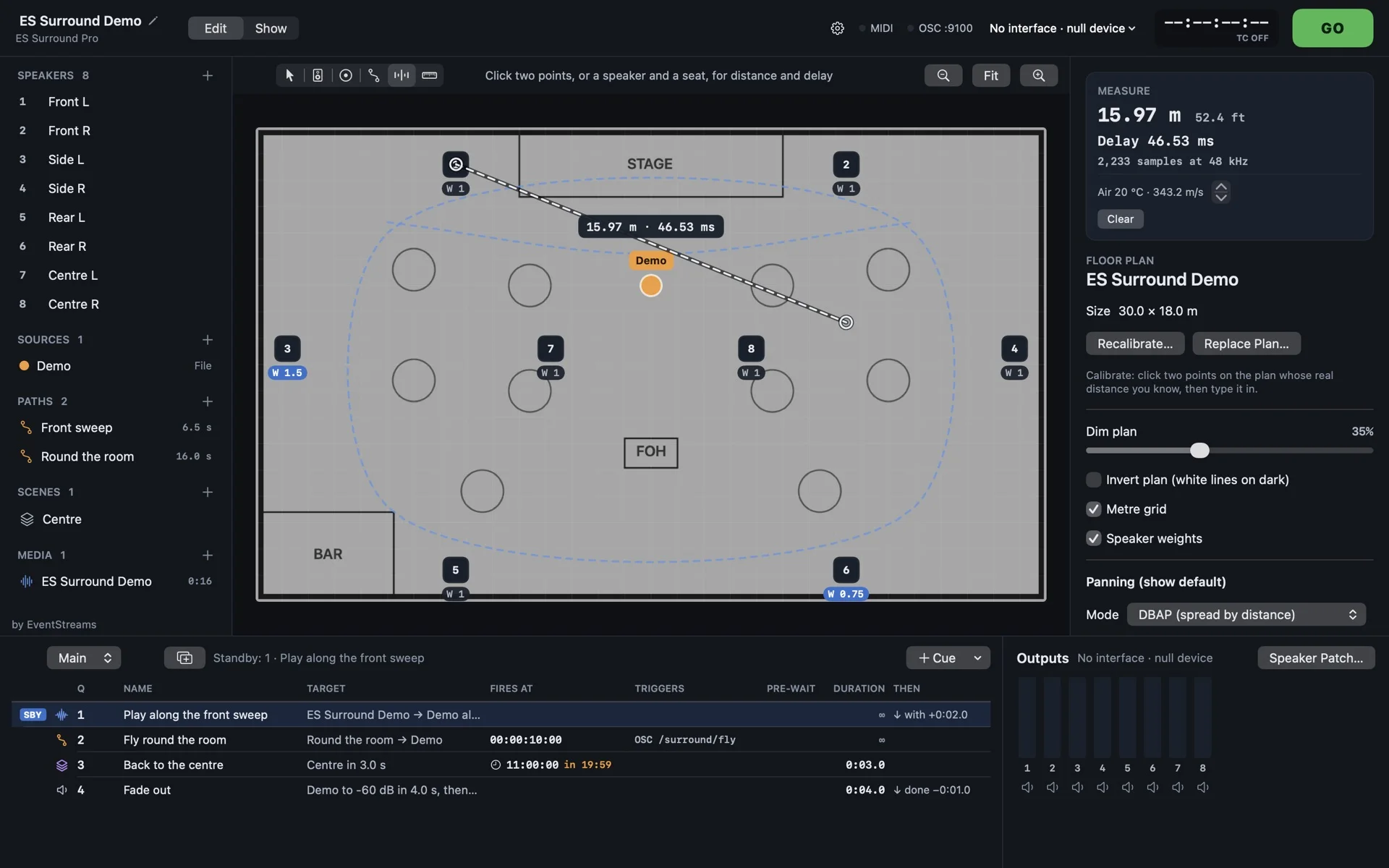
Place your speakers on a floor plan and draw paths. A sound on a path plays from the speakers it passes, louder the closer it gets. Then run the whole show from one GO.
Free for 8 outputs. Pro is a yearly licence: if you stop paying, it keeps working on every version from the years you paid for.
From an empty room to a running show in four steps
Load your plan, place your speakers
Drop in the venue plan as an image or PDF, calibrate it with two clicks and a known distance, then click to place each speaker. Patch every speaker to an output of your sound card on a grid, and play an ident tone from any speaker to check it.
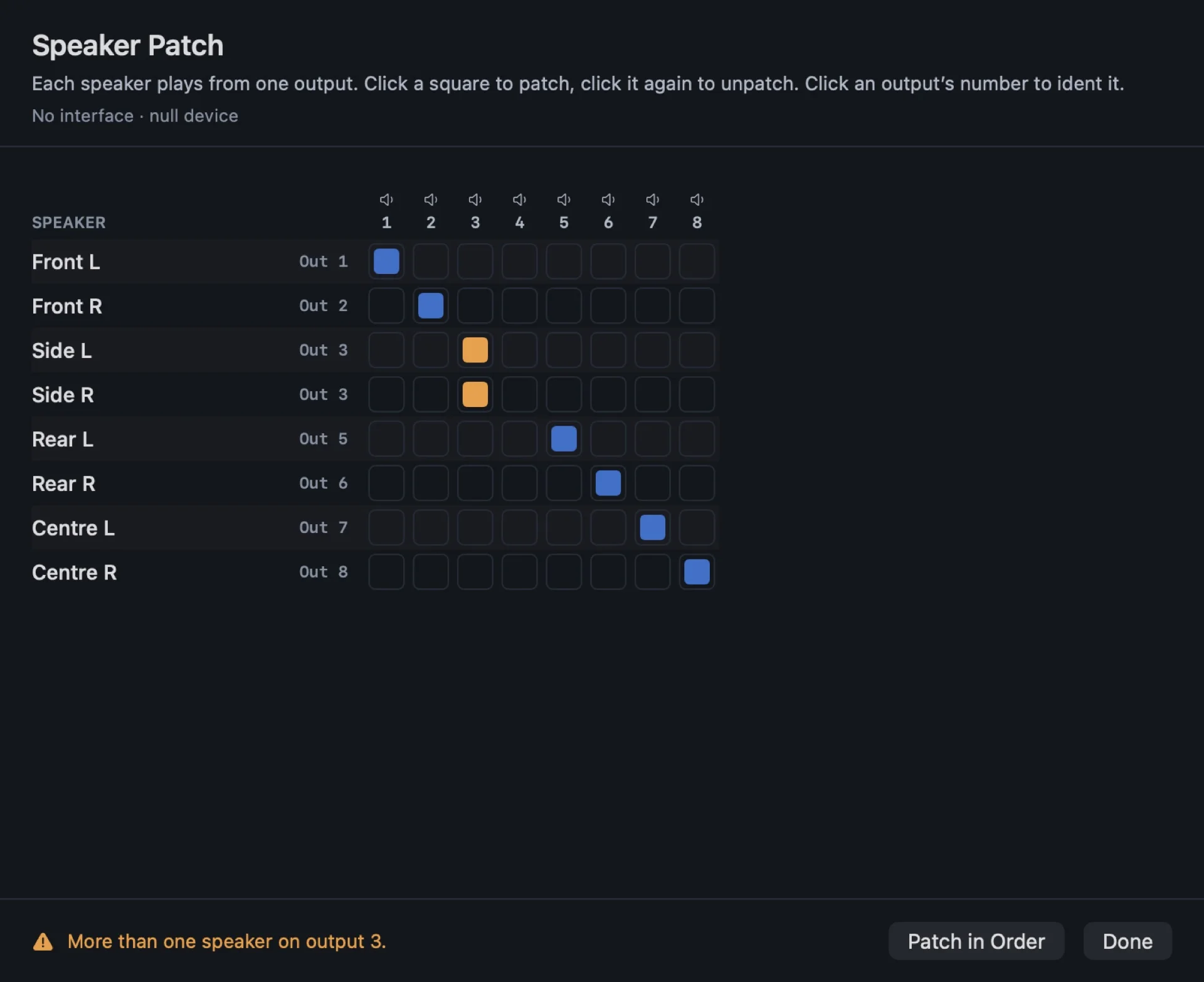
The speaker patch grid. Two speakers on one output show in orange. Draw paths for the sound to follow
Click out a path across the plan and time each step: “takes 3 s”. Give each step its own easing and hold, or loop it and ping-pong it. A sound following a path plays from the speakers it passes, louder the closer it is to each one.
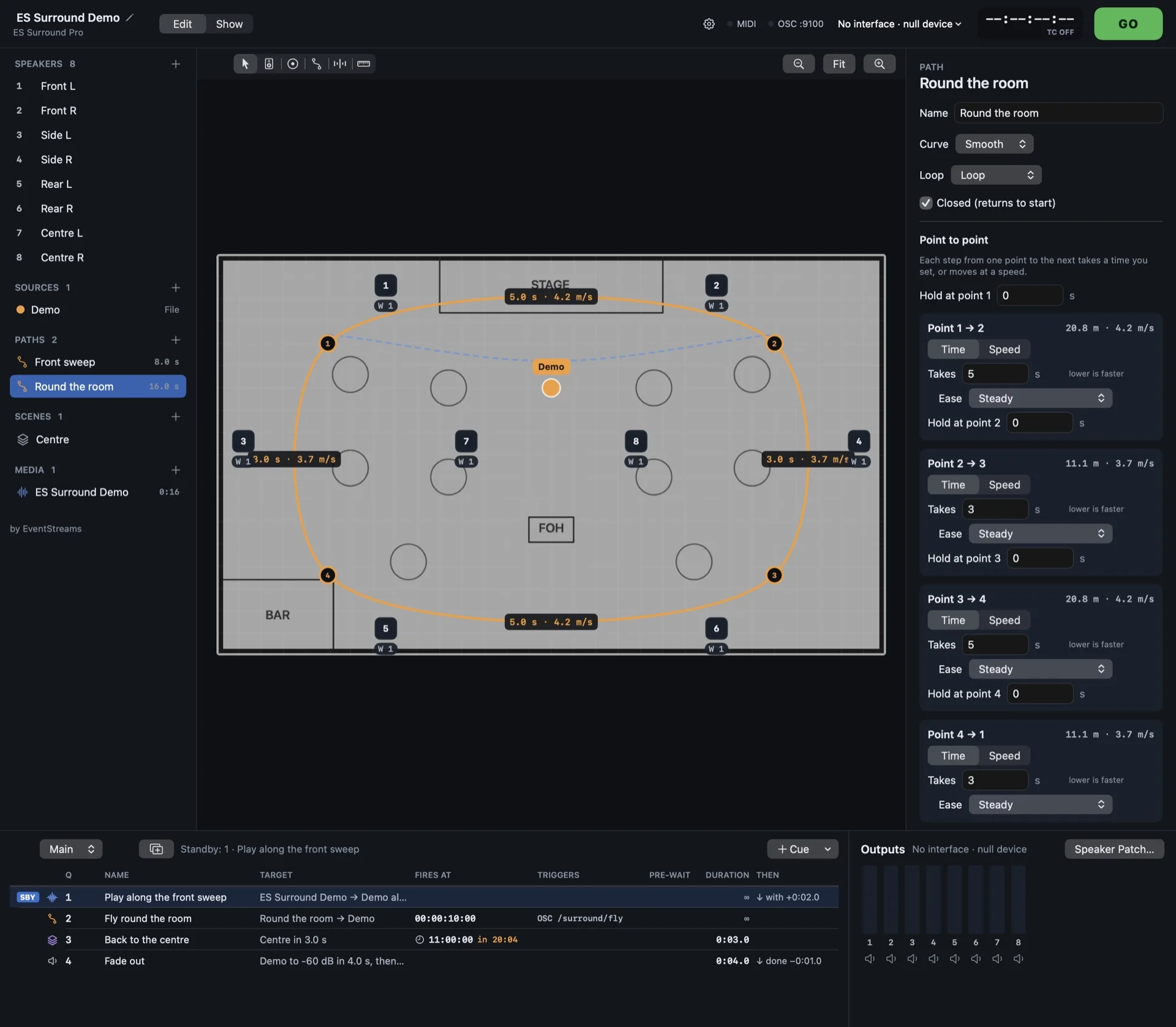
A path timed point to point, with the time, easing and hold for every step. Build the cue stack
Sound, paths, fades, scenes and soft patches go into a cue list that works the way QLab does: pre-wait, post-wait, auto-continue and auto-follow. Fire several cues together, and keep several cue lists.
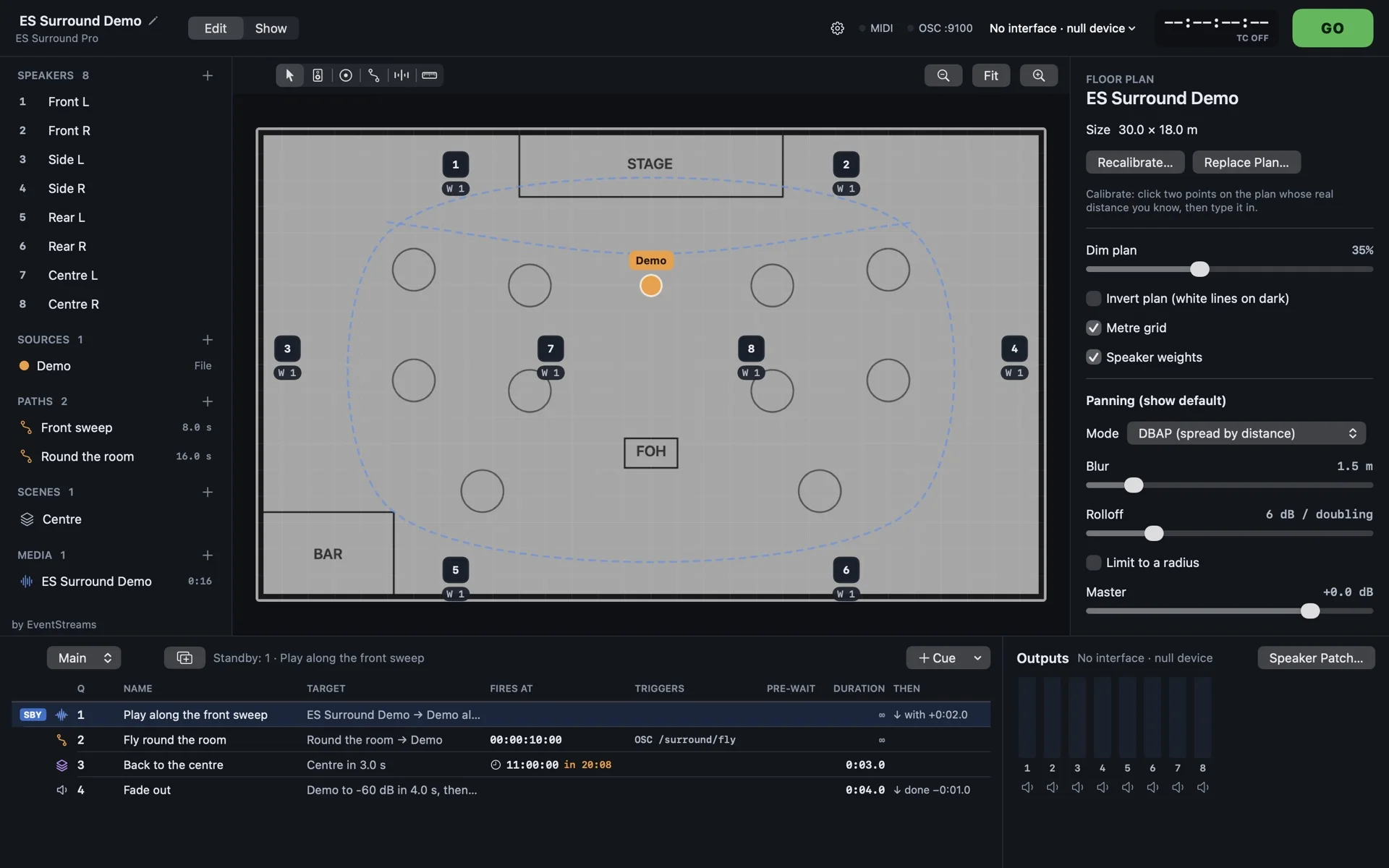
Edit mode. Each cue shows when it fires, what triggers it and what follows. Run it from Show mode
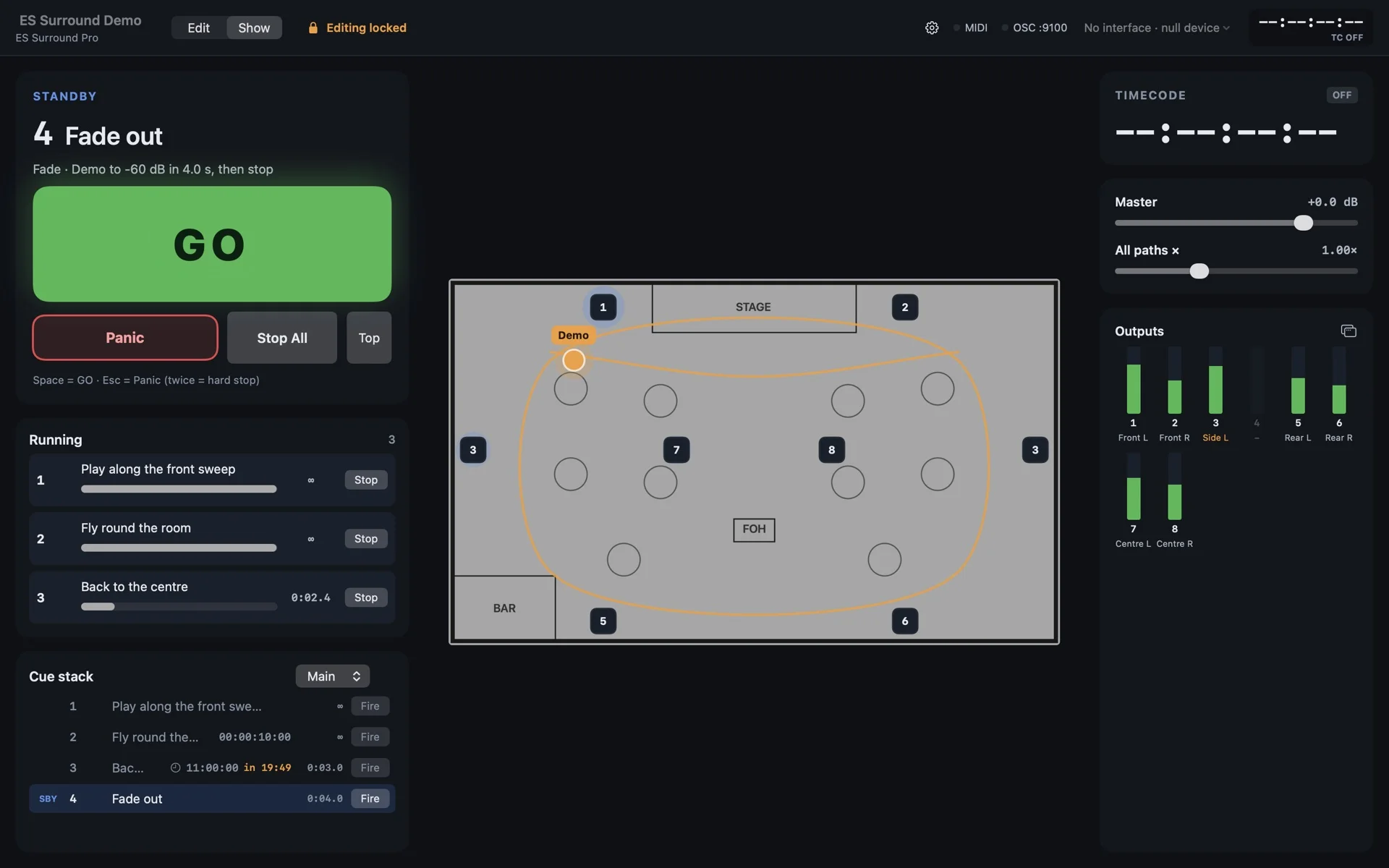
One click and the window shows only what the show needs: a big GO, Panic, live faders and an output meter for every speaker. The plan draws just the sounds that are playing, and the speakers light up as they pass.
Show mode, with three cues running.
Everything a show engineer reaches for
The room, the speakers and the sound
- The plan: a floor plan of your venue, to scale, with every speaker patched to an output.
- Paths: drawn on the plan and timed point to point, with easing and holds. Several paths run at once.
- Panning: distance-based (DBAP), with a per-speaker weight and trim. Speakers light up as the sound passes.
- Sources: your show’s audio files, or live inputs from your interface.
- Your sound card: any Core Audio interface up to 64 outputs, including Dante Virtual Soundcard and Dante interfaces, patched by their own channel names.
Cues and Show mode
- The cue stack: pre-wait, post-wait, auto-continue and auto-follow, and several cue lists.
- Fire times: timecode and clock times, with a countdown as they get close.
- Show mode: a big GO, Panic, live faders and output meters. It shows only what is playing.
- Soft patch: send an input or a file’s channels straight to chosen outputs from a cue.
Fire it from wherever the show already is
- MIDI: notes, program change, control change and MIDI Show Control, with a Learn button.
- OSC: a published address space, with state sent back to your controller.
- Timecode: LTC and MTC, with chase and freewheel, and wall-clock times for fixed-time cues.
- Hotkeys: fire a cue from any key you choose, with nothing to install.
Tools for the engineer
- Measure: the distance and the sound’s travel delay between any two points, for setting delay speakers.
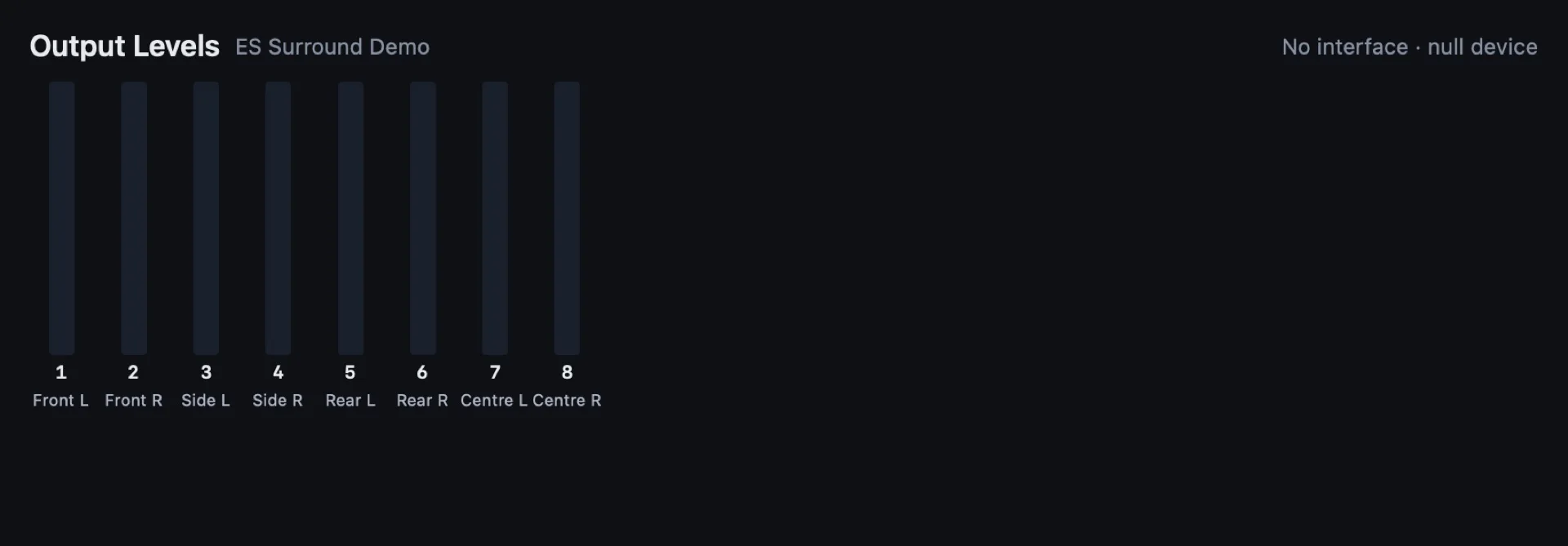
- Output levels: a meter for every output, in a window you can put on a second screen.
- Long files: stream from disk, so a show can play hours of audio with no memory limit.
- The iPad remote: control and edit from the room, including identifying a speaker while you stand next to it.
Works with Stream Deck: any key can fire a cue by its hotkey, or send OSC. An ES Surround plugin is coming soon.
Start free. Pay for Pro when your shows outgrow it
| Feature | Free | Pro |
|---|---|---|
| Outputs | 8 | 64 |
| Sources | 4 | 32 |
| Floor plans, speakers, paths and cues | Yes | Yes |
| GO, hotkeys and wall-clock times | Yes | Yes |
| MIDI and MIDI Show Control | Yes | Yes |
| OSC, with state sent back | Yes | Yes |
| LTC and MTC timecode, with chase and freewheel | No | Yes |
| ES Surround Remote on iPad | No | Yes |
| Price | Free | £129 a year per licence (two Macs) |
| If you stop paying | Free for as long as you like | Keeps working on every version from the years you paid for |
| Macs per licence | Any | 2 |
| Education | Free | 30% off |
Pay yearly. Pro works offline, with a licence key that the app checks on its own at launch. If you stop paying, Pro keeps working on every version released in the years you paid for, and renewing gets you newer versions.
Designed so nothing changes under you mid-show
OfflineES Surround never needs the internet to run a show, and needs no account and no login. It collects nothing. It goes online for two things only: to check for updates, if you let it (at most once a day, never in Show mode), and to fetch your renewed key after you install a version newer than your licence covers, sending only the licence’s number and signature. Offline, you paste the key from your renewal email instead.
Keep the version you rehearsed onSold direct, so you choose when to update: the app tells you when there’s a new version and installs nothing until you say so. Older versions stay downloadable, and a show you rehearsed on one version can run on it on the night.
Pro never switches off mid-showYour licence is checked when the app starts, never while a show is running, and it works offline. When a year ends, the show Mac keeps running the versions you paid for.
A show carries its own audioImported files are copied into the show, so a show folder moves between Macs ready to play. Shows save as .sse.
Run and edit the show from anywhere in the room
EventStreams Surround Remote is a free iPad app. Pair it to your Mac with a QR code, then fire cues, drag sources around the plan live, draw paths with your finger or an Apple Pencil, and play a speaker’s ident tone while you stand next to it. It works with ES Surround Pro on a Mac on the same network.
Coming soon
Download the free edition
We email you a link to confirm your address, then the download starts. Free, with no account.
System requirements
- Mac
- macOS 15 or later, Apple silicon or Intel
- Audio
- Any Core Audio interface, up to 64 outputs, including MADI interfaces. The built-in speakers work for trying it.
- iPad remote
- iPad with iPadOS 18 or later, on the same network as the Mac
- Network audio
- Dante Virtual Soundcard, and Dante interfaces that appear on the Mac as Core Audio devices
- Internet
- Not needed to run a show. Only used to check for updates, if you let it, and to fetch a renewed key after you install a newer version.
- Show files
- .sse, carrying their own audio, so a show moves between Macs
Pro is paid yearly, with a fallback
Pro adds 64 outputs, 32 sources, LTC and MTC timecode and the iPad remote. You pay each year, and it never switches off mid-show. If you stop paying, Pro keeps working on every version released in the years you paid for; renew to get newer versions. Your licence key is shown as soon as you have paid, and emailed to you.
One licence covers two Macs, such as a show Mac and its backup. Sales are final, so try the Free edition first. Need an invoice or purchase order, a rental, or licences for a team? Contact us and we will arrange it directly.
Students, teachers and schools: ask us for your 30% education code.
Questions about ES Surround
- What happens if the internet drops?
- Nothing. ES Surround never needs the internet to run a show. Your Pro licence is a key the app checks on its own, at launch, and a show carries its own audio. The app goes online only to check for updates, if you let it (never in Show mode, and nothing installs until you say so), and to fetch your renewed key after you install a version newer than your licence covers, sending only the licence’s number and signature. Offline, paste the key from your renewal email instead.
- How many Macs does one licence cover?
- Two, such as your show Mac and its backup. Your key is not tied to either Mac’s hardware: to move it, paste it into the new Mac under ES Surround, Enter Licence Key, and stop using it on the Mac it replaces. If you lose your key, we will send it again to the address that bought it. Have your key sent again.
- What happens if I stop paying?
- Pro keeps working, on every version released in the years you paid for, and it never switches off mid-show or on a show Mac. A version released after your paid years runs as Free and says so. Renew to use newer versions, or keep running the version you rehearsed on.
- How do I manage or cancel my subscription?
- Cancelling stops the next renewal, and your keys keep working as above. Email us and we will cancel it for you.
- Can I get a refund?
- No: all sales are final, so please try the Free edition first. It is the whole app within 8 outputs and 4 sources, and Help, Open Demo Show runs a complete show on a MacBook’s own speakers. This does not affect your legal rights if the app is faulty or not as described.
- Is there an education discount?
- Yes: 30% off Pro for students and staff of schools, colleges and universities, and for the institutions themselves. We may ask for proof, such as an institutional email address. Rental and multi-seat licences are quoted directly: contact us.
- Does it work with my sound card?
- It works with any Core Audio interface, up to 64 outputs. USB, Thunderbolt and network-audio interfaces all appear as Core Audio devices. ES Surround follows the interface’s sample rate and never changes it.
- What’s the best way to connect ES Surround to a big system?
- Most systems run Dante, so join it: Dante Virtual Soundcard on the Mac’s Ethernet carries up to 64 channels, or use a Dante interface on USB or Thunderbolt for a dedicated hardware link on a show-critical rig. If your desk, matrix or processor has MADI rather than Dante, MADI is the simplest: a USB or Thunderbolt MADI interface carries all 64 outputs on one coax or fibre cable. For smaller rigs any multi-output interface does. ES Surround sends one feed per speaker; keep EQ, limiting and delay in your system processor.
- Does it work with Dante?
- Yes. ES Surround works with Dante Virtual Soundcard and with Dante interfaces, which appear on the Mac as Core Audio devices. You patch speakers to Dante channels by the labels set in Dante Controller, and ES Surround follows the network’s sample rate rather than setting it. ES Surround is not a Dante-enabled product and is not endorsed by Audinate.
- Can I fire cues from a Stream Deck?
- Yes. Give a cue a hotkey and set a Stream Deck key to press it, or send OSC from a key. An ES Surround plugin for Stream Deck is coming soon: the GO key shows the standby cue, cue keys light while they run, and on Stream Deck + the dials set the master level and path speed.
- Can I fire cues from QLab or a lighting desk?
- Yes. Send MIDI, MIDI Show Control or OSC from QLab or a desk, or sync to LTC or MTC timecode on Pro. ES Surround sends state back over OSC so a controller can show what is running.
- Where are the MIDI and OSC addresses?
- The OSC address space is fixed, and new addresses are only ever added, so a controller layout keeps working. A public reference is not published yet.
- Is there a trial?
- The Free edition is the trial: 8 outputs and 4 sources, with MIDI and OSC, for as long as you like. Help, Open Demo Show tries a whole show on a MacBook’s own speakers.
Questions or a licence to move: hello@eventstreams.co, or book a call. Lost your key? Have it sent again.
Dante is a registered trademark of Audinate Pty Ltd. Stream Deck is a trademark of Corsair Memory, Inc. EventStreams Surround is not affiliated with or endorsed by either company.